Every coding agent’s model. One place.
magpie lists the AI coding agents on your Mac and the model each one is set to. Click a value, pick a model. Any provider, any agent, through one local gateway.

Works with
 Claude Code
 Codex
Codex Gemini CLI
 OpenCode
 Pi
Pi Goose
Goose Cursor CLI
 Copilot CLI
 Crush
Crush
Why magpie
Small, careful, and out of the way.
It lives in the menu bar. It edits the one key you changed and nothing else. It never asks your shell for a key.
One endpoint for every agent
A local gateway speaks OpenAI chat, OpenAI Responses, Anthropic Messages and Gemini, and translates between them — streaming and tool calls included.
Your subscriptions, shared
Signed in to Claude Code, Codex or Copilot? That login becomes a provider every other agent can use. Nothing copied, no key to paste.
Providers in one field
Anthropic, OpenAI, Gemini, DeepSeek, Kimi, GLM, Qwen, OpenRouter, Ollama and a dozen more. Pick a preset, paste a key, done.
Surgical config edits
Comments, ordering and indentation in settings.json, config.toml or config.yaml survive. Writes are atomic.
Real model lists
magpie asks each vendor what it serves. A model released this morning is in the picker on the next refresh — nothing is compiled in.
Profiles
Snapshot every agent’s settings under a name and switch all of them back in one click.
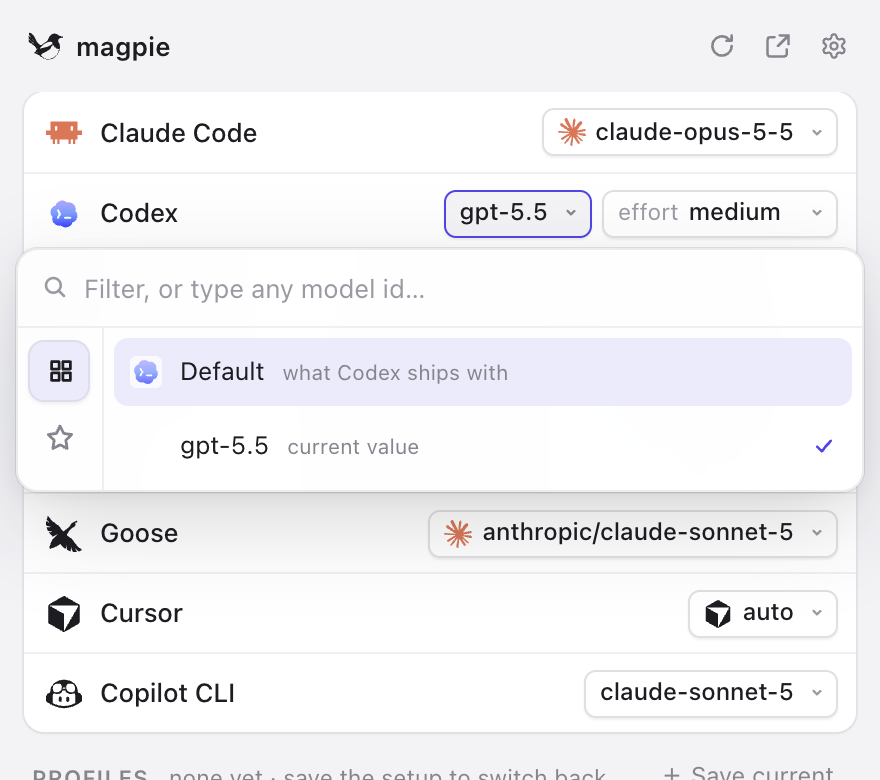
The picker
Click a value. Type. Done.
Every model from every provider you have added, filtered as you type. Anything that isn’t listed can still be typed in.
- Effort, small model, auth — each agent shows the fields it actually has.
- Native or gateway — pick the agent’s own model and magpie puts back exactly what was there.
- Always current — magpie updates itself quietly and restarts when you say so.
The gateway
One base URL, every model.
The gateway listens on 127.0.0.1:3425 and names models provider/model. Agents never hold vendor keys; anything with a base-URL setting can use it.
| Tool speaks | Base URL | Environment |
|---|---|---|
| OpenAI | http://127.0.0.1:3425/v1 | OPENAI_BASE_URL |
| Anthropic | http://127.0.0.1:3425 | ANTHROPIC_BASE_URL |
| Gemini | http://127.0.0.1:3425 | GOOGLE_GEMINI_BASE_URL |
Terminal
Also a TUI and a CLI.
The same app, from a terminal. On Linux, the installer puts the magpie command in ~/.local/bin; on a Mac it installs the app too.
curl -fsSL https://usemagpie.ai/install.sh | sh# pick models magpie ls # every agent and its settings magpie claude opus # agent names take prefixes: cc, oc, gem… magpie codex effort high magpie codex deepseek/deepseek-chat # any catalog model, through the gateway # providers magpie provider add deepseek sk-… # a preset needs only the key magpie provider add ollama # local servers need none # profiles magpie save work && magpie use work magpie tui # the whole app, in the terminal magpie update # install the newest release
